Free training.

Free downloads and free tutorials. Every guide includes the video walkthrough. Watch it, read it, or both.

FREE DOWNLOAD
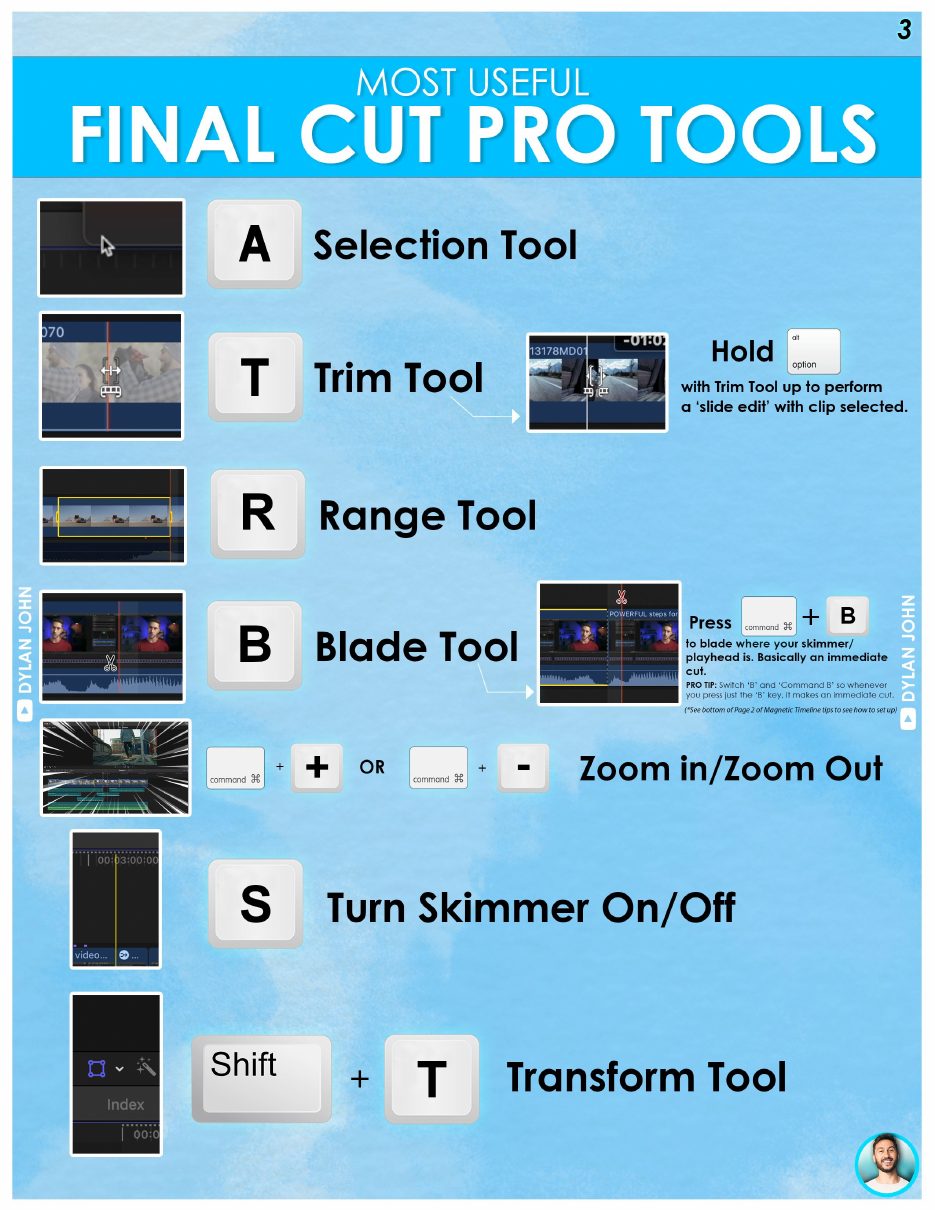
The Best Final Cut Pro Cheat Sheet
The reference that editors keep next to the timeline: every essential shortcut and tool, one glance away while you edit.
No tutorials found Try a different search term, or browse by category above.
WORKFLOWDEC 20237 MIN READ

Bet You Don't Know These 14 Final Cut Pro Tips & Tricks

14 lesser-known FCP tips, from navigation tricks to Paste Attributes, that even experienced editors tend to miss.

Read the tutorial →
WORKFLOWJAN 20247 MIN READ

Level Up With These 15 Final Cut Pro Tips & Tricks

Part two of the tips series: 15 rapid-fire tricks covering timeline moves, audio wins, and workflow habits.

Read the tutorial →
WORKFLOWJAN 20246 MIN READ

These FCP Hacks Will Make You Edit 10X Faster

Custom keyboard shortcuts are the biggest speed upgrade in FCP. How to build your own set with the Command Editor.

Read the tutorial →
WORKFLOWMAY 20248 MIN READ

The Ultimate Guide to Organization in Final Cut Pro

Libraries, events, keywords, smart collections, and the naming habits that keep big projects manageable.

Read the tutorial →
WORKFLOWMAY 20247 MIN READ

This Could Be Why You Suck at Using Final Cut Pro

If FCP feels frustrating, clunky, or slow, it might not be you. Underrated tips that change the whole experience.

Read the tutorial →
COLOR GRADINGOCT 20238 MIN READ

Don't Make These 10 Color Grading Mistakes in Final Cut Pro

Ten color correction and grading mistakes editors make constantly, from skipping the scopes to wrecking skin tones.

Read the tutorial →
PLUGINSJAN 20266 MIN READ

Create Pro-Level Thumbnails Directly in Final Cut Pro

Design YouTube thumbnails without ever leaving FCP using FCB's Thumbnail Creator. Code DYLANSUCKS gets you 10% off.

Read the tutorial →
COLOR GRADINGJUL 20265 MIN READ

Final Cut Pro Just Made Teeth Whitening Embarrassingly Easy

Whiten teeth naturally in under a minute with no plugins, using FCP's built-in masking and color tools.

Read the tutorial →
WORKFLOWJUN 20267 MIN READ

Final Cut Pro Just Got AI Features (And They're Actually Good)

Automatic captions, Auto Mask, Match Color, Edit Detection, and the new trimming display. Everything worth knowing in the 12.3 update.

Read the tutorial →
SOUND DESIGNJUN 20266 MIN READ

3 Final Cut Pro Music Editing Tricks I Use Every Single Edit

Cut on the beat, shorten any track seamlessly, and duck music under dialogue. The three tricks behind every produced-sounding edit.

Read the tutorial →
WORKFLOWJUNE 20266 MIN READ

Best Final Cut Pro Export Settings in 2026

The exact export settings for YouTube, client delivery, and social. Stop guessing what ProRes flavor you need.

Read the tutorial →
WORKFLOWJAN 20268 MIN READ

Final Cut Pro Gets Easier Once You Learn This

The magnetic timeline explained: Position tool, clip connections, keeping music in place, slide edits, and transitions.

Read the tutorial →
EDITINGFEB 20267 MIN READ

Master Beat Detection in Final Cut Pro

How to read the beat detection lines, cut your music to length using storylines, and use beat markers for SFX placement.

Read the tutorial →
EDITINGJUN 20215 MIN READ

How to Copy an Effect to Multiple Clips in Final Cut Pro

Three ways to paste color grades, effects, and attributes across clips: paste attributes, inspector drag, and adjustment clips.

Read the tutorial →
SOUND DESIGNDEC 20259 MIN READ

3 Ways to Improve Your Voice Audio in Final Cut Pro

From a one-click Voice Over Enhancement to a full Compressor + EQ + Limiter chain. Pick the method that fits your workflow.

Read the tutorial →
EDITINGNOV 20256 MIN READ

How to Create a Pop-Up Message Effect in Final Cut Pro

Screen record, luma keyer, blend modes, and compound clips to make a real phone notification appear over your footage.

Read the tutorial →
EDITINGOCT 20258 MIN READ

Every Way to Cut in Final Cut Pro (Beginner to Pro)

Blade tool, J-cuts, L-cuts, slip and slide edits, range delete, exact duration. Every cutting method explained.

Read the tutorial →
SOUND DESIGNSEP 20257 MIN READ

The Free App That Makes Sound Design Stupid Easy

Soundly gives you 18,000+ free SFX, smart search, Find Similar, and a direct S-key send to Final Cut Pro. No subscription needed.

Read the tutorial →
EDITINGAUG 202511 MIN READ

How to Make Click-Worthy Thumbnails in Final Cut Pro

Hold frames, Magnetic Mask cutouts, backgrounds, glow, text, and exporting at the right size, all inside FCP.

Read the tutorial →
WORKFLOWJUL 20254 MIN READ

Final Cut Pro Playing Random Audio? Here's the Fix

Two causes for mystery audio on your timeline (invisible L-cuts and ghost tracks in the Index) and how to kill both.

Read the tutorial →
WORKFLOWMAY 20258 MIN READ

3 Final Cut Pro Hacks That'll Save You Hours

A plugin favorites folder, getting your SFX inside FCP directly, and custom keyboard shortcuts for audio roles.

Read the tutorial →
PLUGINSAPR 20257 MIN READ

How to Take Out Background Noise in Final Cut Pro

Rescue grainy low-light footage with Neat Video, the best noise reduction plugin for FCP, plus the settings that keep skin looking real.

Read the tutorial →
EDITINGJUL 202510 MIN READ

Tricks to Spice Up Boring Footage in Final Cut Pro

Digital motion, smooth slow-mo, fake depth of field, color grading techniques, and the Magnetic Mask blur trick.

Read the tutorial →
EDITINGNOV 20248 MIN READ

3 Creative Ways to Use the Magnetic Mask in Final Cut Pro

Selective color grading, background blur on any lens, and title reveals that put text behind your subject, all using FCP's built-in AI masking.

Read the tutorial →
WORKFLOWMAR 20247 MIN READ

Final Cut Pro Settings That Are Killing Your Workflow

Seven settings to change right now: playback quality, background rendering, keyboard shortcuts, and more.

Read the tutorial →
EDITINGOCT 20237 MIN READ

Create Pop-Up Animations With Ease and For Free

Scale keyframes, velocity curves, and a three-keyframe bounce sequence for snappy pop-up animations inside Final Cut Pro, no plugins required.

Read the tutorial →
WORKFLOWAUG 20227 MIN READ

The Solution to Making Your Videos Vertical in Final Cut Pro

Set up a 9:16 project, use Spatial Conform Fill, reframe your clips, and export clean vertical video for Reels, Shorts, and TikTok.

Read the tutorial →
EDITINGMAY 202210 MIN READ

10 Things You're Doing Wrong In Final Cut Pro

Transcoding, Keywords, Compound Clips, audio roles, export settings. Ten common Final Cut Pro mistakes and exactly how to fix each one.

Read the tutorial →
EDITINGNOV 20196 MIN READ

You're Doing Cinematic Black Bars Wrong in Final Cut Pro

Why cropping your footage is the wrong approach, and how to add letterboxing as a non-destructive overlay you can adjust or remove in seconds.

Read the tutorial →
EDITINGJUN 20267 MIN READ

Final Cut Pro Transition Tricks That Are Actually Useful

Adjustment clip transitions, Option+drag copy, default shortcut, Precision Editor, nudge keys, and swap tricks.

Read the tutorial →
PLUGINSMAY 20267 MIN READ

This $49 Final Cut Pro Plugin Pack Has EVERYTHING

The Absolute Pack by LenoFX: 175 plugins, 7,050 presets, Easy Installer, and a full breakdown of what makes it worth it.

Read the tutorial →
EDITINGMAY 20266 MIN READ

This Free Transition Makes Cuts Feel Invisible in Final Cut Pro

How to use the Flow transition to eliminate jump cuts. It's free, built-in, and surprisingly effective when used right.

Read the tutorial →
WORKFLOWMAY 20267 MIN READ

The #1 Mistake You're Making Before Cutting Footage in Final Cut Pro

Stop using Synchronize Clips for multi-camera setups. The right way is Multicam Clips, and here's why it matters.

Read the tutorial →
WORKFLOWAPR 20266 MIN READ

These 4 Final Cut Pro Tips Are Too Good

Loop+Replay, Reference New Parent Clip, drag effects to the Viewer, and Option+drag to copy transitions.

Read the tutorial →
PLUGINSAPR 20266 MIN READ

The Worst Final Cut Pro Plugin That I Use Every Day

Pro Zooms reviewed honestly: what it does well, where it falls short, and why it's still worth using for zoom effects.

Read the tutorial →
EDITINGAPR 20267 MIN READ

The Seamless Mask Trick in Final Cut Pro

How to use the Magnetic Mask to create seamless subject transitions and creative masking effects in FCP.

Read the tutorial →
EDITINGMAR 20266 MIN READ

Fix This Annoying Final Cut Pro Transition Problem

Why FCP won't let you apply a transition and how to fix the insufficient media handles issue once and for all.

Read the tutorial →
COLORFEB 20268 MIN READ

The Biggest Color Grading Mistakes in Final Cut Pro

Five grading mistakes that make footage look amateur, plus the corrections that actually move the needle.

Read the tutorial →
WORKFLOWDEC 20257 MIN READ

Stop Losing Great Clips in Final Cut Pro

How to use Smart Collections, Keywords, and the FCP library structure to find any clip in seconds, not minutes.

Read the tutorial →
WORKFLOWNOV 20257 MIN READ

Why Didn't I Use This Final Cut Pro Feature Sooner?

The FCP feature that most editors overlook, and how it completely changes the speed and flexibility of a color workflow.

Read the tutorial →
COLOROCT 20258 MIN READ

Cinematic Color Grading in Final Cut Pro with EMUL8

How to use the EMUL8 film emulation plugin: adjustment clips, Comparison Viewer, Look Designer, and Film Compression.

Read the tutorial →
EDITINGOCT 20257 MIN READ

Create This Animated Split-Screen Effect For Free in Final Cut Pro

Build a polished animated split-screen using only built-in FCP tools: crop, keyframes, position, and a dividing line.

Read the tutorial →
EDITINGSEP 20257 MIN READ

The Clever Editing Effect YouTubers Use (Glow Effect in FCP)

Three glow techniques: Luma Key glow, Magnetic Mask glow, and beam of light, all built entirely inside Final Cut Pro.

Read the tutorial →
SOUND DESIGNAUG 20256 MIN READ

Your Voice Audio Sucks. Instantly Fix It For Free.

Auphonic removes noise, normalises levels, reduces reverb, and fixes breath sounds, all automatically and free up to 2 hours/month.

Read the tutorial →
PLUGINSJUN 20259 MIN READ

Top 10 FREE Final Cut Pro Plugins in 2025

The best free FCP plugins right now: FCB Installer, Tap5a, LenoFX, Brad West's pack, and more that actually earn their spot.

Read the tutorial →
WORKFLOWMAR 20257 MIN READ

Stop the FCP Madness: 5 Annoying Things and Their Easy Fixes

Playback lag, clips moving unexpectedly, bloated libraries, transitions that won't apply, and audio sync issues. All fixed.

Read the tutorial →
COLORAPR 20259 MIN READ

Creating a Commercial Look with Color Finale 2 Pro

Node structure, saturation control, skin tone matching, vignette, and sharpening for a polished commercial-grade result.

Read the tutorial →
COLORDEC 20249 MIN READ

How to Color Grade Your Drone Footage in Final Cut Pro

D-Log M setup, sky exposure fixes, gradient masks, matching across shots, and the cinematic aerial color look.

Read the tutorial →
EDITINGNOV 20235 MIN READ

Start Your Videos With This Transition Trick

The fast-cut kinetic open: how to build a B-roll teaser intro that hooks viewers in the first five seconds.

Read the tutorial →
WORKFLOWFEB 20236 MIN READ

Create YouTube Videos Faster: 5 FCP Tips and Tricks

Five workflow habits that cut editing time on every YouTube video, from import to export.

Read the tutorial →
COLOR GRADINGJUN 20237 MIN READ

Joker Color Grade in Final Cut Pro: Step-by-Step

Recreate the iconic desaturated, high-contrast Joker cinematic look using only FCP's built-in color tools.

Read the tutorial →
SOUND DESIGNMAR 20235 MIN READ

How to Remove Breath Sounds in Final Cut Pro

Use the Channel EQ high-pass filter and volume keyframes to remove distracting breath sounds from dialogue audio.

Read the tutorial →
WORKFLOWJUL 20237 MIN READ

10 AI Tools Every Final Cut Pro Editor Should Know

The AI tools that actually save time in a real FCP workflow, from transcript editing to background removal.

Read the tutorial →
EDITINGJUL 20265 MIN READ

Try This Skin Smoothing Hack in FCP (No Plugins)

Use the Hue/Saturation Curves and blend modes inside Final Cut Pro to smooth skin tones without third-party tools.

Read the tutorial →
EDITINGSEP 20235 MIN READ

Create This Cool Intro Effect in Final Cut Pro

Build a dynamic, layered video intro effect using FCP's built-in tools. Perfect for YouTube channel opens and promos.

Read the tutorial →
EDITINGSEP 20235 MIN READ

Convert Horizontal to Vertical Video in Final Cut Pro

The fastest workflow for turning 16:9 footage into clean 9:16 vertical video for Reels, Shorts, and TikTok.

Read the tutorial →
COLOR GRADINGSEP 20236 MIN READ

Try This Music Video Color Grade in Final Cut Pro

Recreate the high-contrast, punchy look used in professional music videos using FCP's built-in color tools.

Read the tutorial →
WORKFLOWJUL 20237 MIN READ

Stop Doing These 10 Things in Final Cut Pro

Ten common FCP habits that are slowing you down, and the right approach for each one.

Read the tutorial →
WORKFLOWJUL 20236 MIN READ

Why FCP Struggles With Your Footage (And How to Fix It)

Why Final Cut Pro lags with certain codecs and the transcoding strategy that eliminates playback problems for good.

Read the tutorial →
SOUND DESIGNJUN 20236 MIN READ

3 Audio Tricks Every FCP Editor Should Know

Three audio techniques that immediately improve production quality: noise removal, SFX layering, and audio role management.

Read the tutorial →
EDITINGMAY 20236 MIN READ

3 Mind-Blowing Final Cut Pro Hacks Every Editor Should Know

Three underused FCP features that completely change how you work, including one most editors have never found.

Read the tutorial →
COLOR GRADINGAPR 20237 MIN READ

DaVinci Resolve Color Grading Features in Final Cut Pro

How to get a DaVinci Resolve-style node-based color workflow inside FCP using Color Finale, without leaving your editor.

Read the tutorial →
WORKFLOWAPR 20236 MIN READ

Master Stabilization in Final Cut Pro

How to use FCP's built-in stabilization effectively: the settings that actually work and when to reach for them.

Read the tutorial →
WORKFLOWMAR 20236 MIN READ

The Simple Trick to Shrinking Your Huge FCP Library Sizes

Why FCP libraries balloon in size and the simple trick that dramatically reduces how much storage they consume.

Read the tutorial →
PLUGINSMAR 20236 MIN READ

The Best Picture-in-Picture Plugin for Final Cut Pro

An honest review of The Final Cut Bro's PiP plugin: what it does well, its limitations, and whether it's worth adding to your toolkit.

Read the tutorial →
SOUND DESIGNFEB 20235 MIN READ

Make Your Voice Sit Better Over Music in Final Cut Pro

Use the Channel EQ high-pass filter and frequency carving to make voice audio sit cleanly over background music.

Read the tutorial →
COLOR GRADINGJAN 20236 MIN READ

This One Trick Will Help Your LUTs Look Better

Why your LUTs look flat or wrong in FCP, and the single correction that makes every LUT work the way it's supposed to.

Read the tutorial →
WORKFLOWDEC 20226 MIN READ

5 Tips to Make Your Life Easier in Final Cut Pro

Five small workflow changes that remove friction from everyday editing: Clip Appearance, Compound Clips, Roles, and more.

Read the tutorial →
EDITINGDEC 20227 MIN READ

Stop Ignoring These Amazing Final Cut Pro Effects

Optical Flow, Noise Reduction, Glow, Unsharp Mask. The built-in FCP effects most editors have never properly used.

Read the tutorial →
EDITINGDEC 20226 MIN READ

Learn This Basic but Important Editing Technique in FCP

The J-cut and L-cut: the foundational audio-video technique that makes every cut feel natural and professional.

Read the tutorial →
EDITINGNOV 20227 MIN READ

These Cool Effects Come With Final Cut Pro

Generators, transitions beyond the cross-dissolve, Motion Blur, Vignette, Film Grain, all built right into FCP.

Read the tutorial →
EDITINGDEC 20215 MIN READ

The Final Cut Pro Tool Every Editor Should Be Using

There's one key in FCP most editors have never pressed, and once you know it, you'll use it in every single edit.

Read the tutorial →
COLOR GRADINGOCT 20225 MIN READ

The Best Way to Find the Look for Your Video

Build a carousel of looks with FCP's audition feature and compare LUTs and grades side by side, fast.

Read the tutorial →
SOUND DESIGNOCT 20225 MIN READ

My Secrets to Tutorial Sound Design

Precise SFX placement with solo and nudge keys, re-timing effects to match visuals, and decibel-level volume control.

Read the tutorial →
EDITINGOCT 20225 MIN READ

Tricks to Make You a FCP Superhero

Pull assets straight from Apple's apps, organize your SFX inside FCP, remap keys, and build purpose-built workspaces.

Read the tutorial →
WORKFLOWSEP 20224 MIN READ

5 Awesome FCP Tips to Blow Your Mind

Five fast tips, including a full-height Inspector and clip replacement that keeps your transitions intact.

Read the tutorial →
SOUND DESIGNAUG 20225 MIN READ

5 Key Tips to Improve Your Sound Design

Ambient beds, hits and risers on key moments, smart layering, and a clear mix hierarchy for immersive audio.

Read the tutorial →
WORKFLOWAUG 20224 MIN READ

Time-Saving FCP Editing Tips

Duplicate customized transitions instantly, copy colors between elements with a drag, and master paste attributes.

Read the tutorial →
COLOR GRADINGAUG 20225 MIN READ

This Simple Hack Will Help Your Color Grades Pop

Shape masks and exposure shaping that draw the eye, plus fake depth of field and targeted sharpening.

Read the tutorial →
EDITINGAUG 20225 MIN READ

Secrets of Editing a Video Portrait

A complete portrait workflow: organizing selects with favorites, adding dynamic motion, and a Super 8 film look.

Read the tutorial →
EDITINGJUL 20225 MIN READ

This One Editing Technique Can Drastically Improve Your Videos

The Kuleshov Effect: how the order of your shots changes their meaning, and how to use it deliberately.

Read the tutorial →
SOUND DESIGNJUN 20225 MIN READ

Cinematic Transition Sound Design

Whooshes, risers, and impacts that accent your music, cuts on the beat, and audio roles to keep it all organized.

Read the tutorial →
SOUND DESIGNMAR 20225 MIN READ

The Secret to Dynamic Sound Design

Switch your project to surround and use six audio channels and ambience pan modes for sound with real depth.

Read the tutorial →
WORKFLOWFEB 20225 MIN READ

How to Share Your FCP Library the Right Way

Hand off a project to another editor without a gigantic transfer, keeping all media linked and intact.

Read the tutorial →
SOUND DESIGNFEB 20226 MIN READ

In-Depth Cinematic Sound Design Breakdown

A complete trailer sound design dissected layer by layer: roles, ambient beds, foley, design SFX, and processing.

Read the tutorial →
EDITINGOCT 20215 MIN READ

Master the Object Tracker in FCP 10.6

Track titles, effects, and images onto moving subjects with FCP's built-in machine-learning tracker.

Read the tutorial →
SOUND DESIGNOCT 20214 MIN READ

Make Your Voice Sound Deeper

Get a fuller, richer voiceover two ways: precise Channel EQ adjustments or the one-click enhancement preset.

Read the tutorial →
COLOR GRADINGSEP 20214 MIN READ

The Hidden Tool That Will Help You Color Grade

Range Check catches blown highlights, crushed blacks, and oversaturated colors before your viewers do.

Read the tutorial →
SOUND DESIGNSEP 20214 MIN READ

Fix Sharp S and T Sounds

Tame piercing sibilance in voiceovers and dialogue with FCP's built-in De-Esser, explained control by control.

Read the tutorial →
WORKFLOWSEP 20216 MIN READ

8 Problems in FCP and How to Fix Them

Missing files, audio glitches, and mystery timeline changes: eight common problems, each with a real fix.

Read the tutorial →
COLOR GRADINGAUG 20215 MIN READ

Zack Snyder's Justice League Color Grade

Recreate the film's desaturated, muted cyan look step by step, with Color Finale 2 Pro or native FCP tools.

Read the tutorial →
COLOR GRADINGAUG 20215 MIN READ

A Classy Teal and Orange Look

The cinematic complementary look done tastefully: log conversion, split toning, and protected skin tones.

Read the tutorial →
COLOR GRADINGJUL 20216 MIN READ

How to Use Color Finale 2 Pro: The Complete Tutorial

The full Color Finale 2 walkthrough: layer-based grading, wheels, curves, masks, and a professional workflow.

Read the tutorial →
COLOR GRADINGJUL 20214 MIN READ

A Simple yet Stylized Color Grade

A beginner-friendly grade that adds real character in a few steps, plus bonus light shaping with masks.

Read the tutorial →
EDITINGFEB 20215 MIN READ

Free Pro Mist Effect (No Plugins)

The dreamy diffusion-filter look built entirely from FCP's free built-in effects: soft highlights, glowing edges.

Read the tutorial →
EDITINGJAN 20215 MIN READ

Realistic Highlighter Effect (No Plugins)

The animated highlighter-on-text look from documentaries and Vox videos, built with FCP's native tools.

Read the tutorial →
WORKFLOWAPR 20217 MIN READ

Final Cut Pro Tips in 60 Seconds

The complete Final Cut Fridays collection: nine sixty-second tips covering playback, trimming, snapshots, and more.

Read the tutorial →
EDITINGJAN 20234 MIN READ

The Range Tool Is the FCP Tool Every Editor Should Be Using

Partial exports, surgical deletes, and precise adjustments to any slice of your timeline with one tool.

Read the tutorial →

Get notified when new guides drop

New tutorials land regularly. One email when they do. No spam, no filler.